Links

Things worth sharing, with a little context.

Spotify Engineering Culture

vimeo.com

This is the first part of a video describing Spotify’s development process and it’s well worth the watch. It addresses challenges facing large scale development teams when using an agile workflow such as scrum or kanban.

The Ultimate Guide to Solving iOS Battery Drain

overthought.org

An excellent guide to improving the battery life of your iOS device1, which I will start sending out to everyone claiming that their battery drains too quickly.


  1. It’s not the usual turn off 3G/LTE stuff which you normally read about. ↩

A Visual History of OmniFocus for Mac

shawnblanc.net

Shawn Blanc provides some insight into the history of OmniFocus and how it all started, complete with screenshots.

What is more interesting is that the visual UI has virtually been the same for the past six years. Even though it has started to look somewhat dated lately, it has been fully functional and enough aesthetically pleasing to still be the go-to GTD tool.

OmniFocus 2 for Mac resumes testing, will ship in June

omnigroup.com

The Omni Group just announced that they have resumed public testing of OmniFocus 2. If you already have an account from the previous test builds, you can reuse those credentials to download the new version.

We’re thrilled to resume the OmniFocus 2 Test today! We’ll ship it in June: http://t.co/jkwmMVnbuZ

— OmniFocus (@OmniFocus) March 26, 2014

View original source

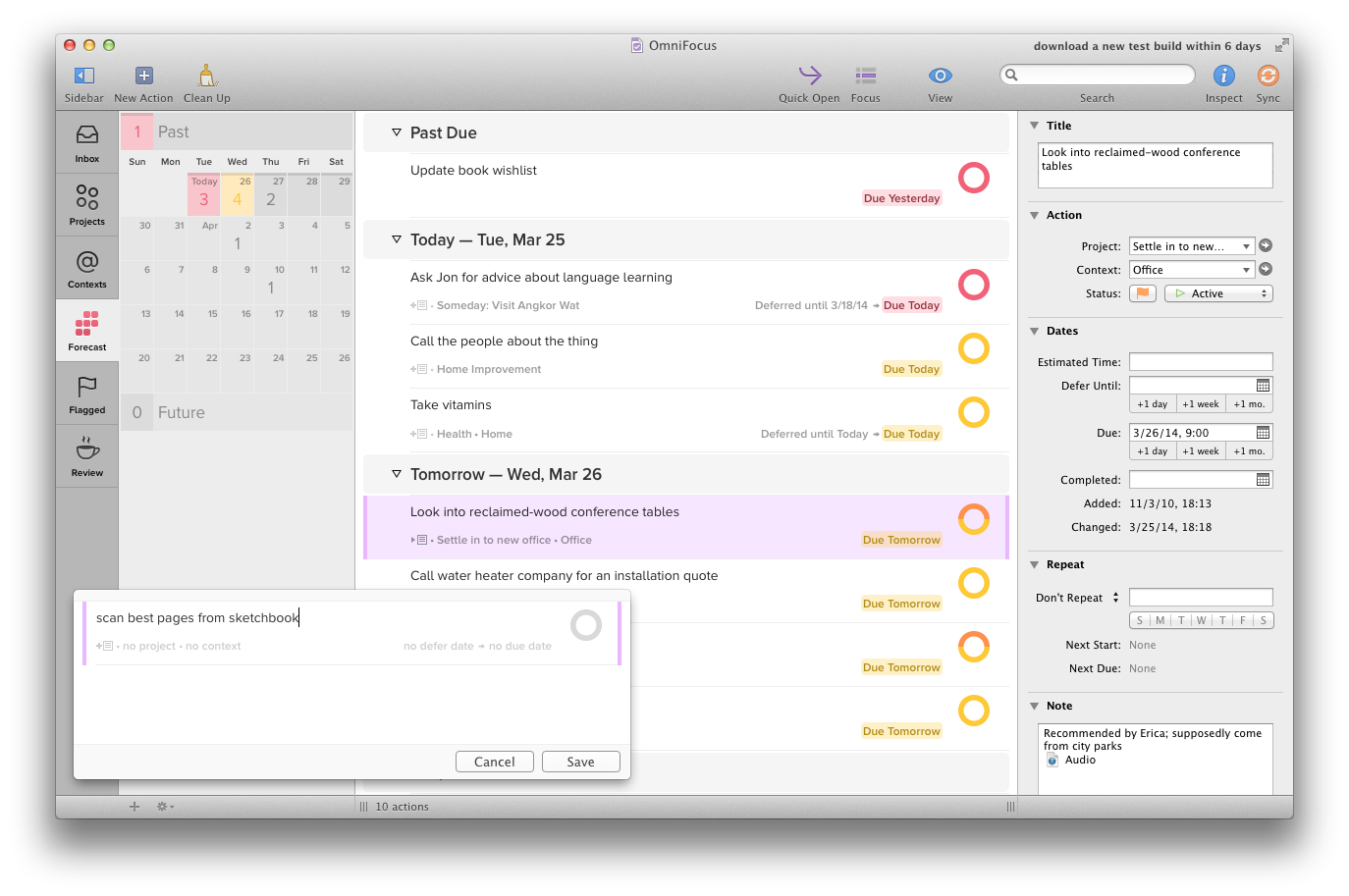
After having started the application for the first time, things look quite different from the last test. I will dive into the new features and give my two cents as I test the new builds.

OmniFocus-2-ships-in-June

What the new Omnifocus 2 beta currently looks like

Quick GTD introduction video by Epipheo

youtube.com

Comparing the todo list with something familiar, such as the calendar, makes it exceptionally easy to comprehend the core of GTD.

This video illustrates an interview with David Allen where he talks about how to get things out of your head and into a trusted system, making the mind free to focus and be creative.

2048 AI

ov3y.github.io

The new puzzle game 2048 as I mentioned earlier, now has a fork which includes an AI and a hint button. The funny thing is that the AI failed to complete the puzzle when I tried using it.

I can see an algorithm war coming and each contender writes their own algorithm, with an end goal of finishing the game with the highest score possible.

2048

gabrielecirulli.github.io

The most addictive game so far this week is without a doubt 2048 (sorry Flappy Bird), a simple web based numbers game controlled by the arrow keys. Swiping on the iPad works excellent as well, making it easier than ever to abuse play all the time.

The main goal of the game is to get a 2048 block which is done by combining blocks with the same number to form a superblock containing the sum of the smaller blocks.

There are striking similarities with the popular Threes game for iPhone, but there are subtle differences as well, making this game all the more entertaining and addictive. When moving blocks for instance, they are always moved to the edge of the screen and not just one block away.

The best part however is that this game is completely open source and available on GitHub to play with.

f.lux for Mac beta

justgetflux.com

One of my favorite apps for the Mac has finally released a new beta  after a long time, with support for greater control of your day.

The new version of f.lux makes a schedule just for you, so you can use a screen that knows when you sleep, as well as when the sun’s up. We found a way to combine your day with sunrise and sunset.

A part from actually going outside to catch some sun1, this is probably the best alternative to get a natural rhythm.


  1. Winters in Sweden provide little or no sun, which rules this out as an option. ↩

Windows 8 and the Microsoft Surface

ignorethecode.net

If you are going to read one review of Microsoft Surface 2, make it this one by Lukas Mathis who is a long-time Mac user.

Another difference between the Surface and an iPad is the Surface’s split screen mode. iPad owners often note that the iPad’s «one app owns the screen» system is a good idea, since people can’t multitask anyway. But that ignores that people often need multiple apps to work on a single task. I can’t count the instances where I’ve used split screen mode just in the last few days. I’m in a meeting, taking notes in OneNote while looking at last week’s meeting notes. I’m responding to an email while looking at a spec. I’m making a drawing while looking at a reference. I’m changing a mockup based on feedback in an email. I’m taking notes during a Skype call.

This is definitely one of my main issues with the iPad as well. Not being able to research something while writing at the same time is a big pain. Pasting the research content into the writing app is a poor way of solving the problem.

What I would like to see is something like what Microsoft have done with Surface, but with an Apple twist. Something in the lines of having a main app which runs in normal iPad mode, and the ability to run a second app in 1/4 of the space in landscape mode. The twist being that the secondary app has to be a multi-platform app, and when bringing it up in secondary mode, its iPhone user interface is shown.

This could fit quite nicely and would be a terrific asset, and I can imagine a lot of use cases where this would be a fantastic way of getting things done.

The problem with Metro might not be that it’s performing badly at its intended function. The problem might simply be that, unlike me, most people don’t want to use their tablets for productivity. They’d rather keep using their old Windows PC for that, and also have an iPad for watching movies and playing games.

This is a valid and fair point. Having the ability to distinctly separate devices for work and play can definitely bring peace of mind and the ability to focus better1.

I personally prefer using the iPad for as many things as possible2, including reading, answering email and using productivity tools such as OmniFocus and the calendar. When in serious “work mode” though, nothing beats the MacBook Air.


  1. Don’t add your work email to your iPad if you only use it for personal tasks and entertainment though. ↩

  2. I do recommend turning off notifications if you plan on using the iPad for work and personal tasks. ↩

OmniFocus 2 for iPhone manual available for free

itunes.apple.com

The Omni group have just released a manual for OmniFocus 2 for iPhone for free in the iBooks Store. I haven’t had the chance to read it yet, but I have a feeling that any seasoned OmniFocus user will not find it especially enlightening.

I do however like the fact that they decided to publish it in the iBooks Store. This means that I will always have it available if needed, without having to resort to keeping it in Dropbox or have a link bookmarked somewhere.

IMDB Top 100K Movies Analysis in Depth

bugra.github.io

Some quite interesting statistics created from the huge IMDb dataset from over 100 000 movies dated from 1950 to 2013.

You can for instance see that drama movies count for almost half of all movies created during that time, and that comedies comes in at second place with 30 percent.

Another interesting statistic is in 2013, when there were twice as many movies created compared to the previous year, and about six times as many as in the 50’s.

If the above link seemed fascinating to you, check out part 2 of the series as well.

Apple releases iOS 7.0.6 fixing a serious SSL/TLS vulnerability

support.apple.com

Information regarding the vulnerability is currently terribly scarce, but judging by the information in the Apple KB, it sounds very serious indeed and would allow man-in-the-middle attacks on SSL/TLS connections.

The problem was apparently found by Roland Moriz when trying to use curl on Mac OS, where it failed to identify a simple Common Name mismatch. (email proof)

What this means in reality is that someone who sits between you and a target site, such as your bank or Facebook, would be able to listen in on your traffic and potentially modify information as it is being sent to the server.

Typography in Moon

typesetinthefuture.com

The beautifully typography focused review of Moon makes one look at typography and fonts in an entirely different light. Who knew that those small details make for an incredible difference in perception.

Yes, you heard me right – the filmmakers are foreshadowing upcoming events via the lyrics of a Chesney Hawkes song.

There are lots of hints throughout the movie subtly hinting the inevitable plot twist, such at the wake up song and even the credits for the main character.

All of which is a timely reminder that this frankly awesome sci-fi film was made on a budget the size of a postcard. Which just makes its amazing styling and design all the more impressive. Indeed, Moon is one of my favorite examples of sci-fi storytelling through design – and, to my mind, a worthy successor to Kubrick’s masterpiece.

Definitely see Moon if you haven’t, then read the typography analysis.

A person how did post-production of the movie has written a comment on Hacker News with details and trivia worthy of a read as well.

The view from Netflix’s war room at the launch of ‘House of Cards’

m.theglobeandmail.com

Netflix just launched season two of their popular series House of Cards starring Kevin Spacey. Despite having a Netflix account, I have never actually watched it. But with all the buzz going on these past few days, it’s hard not to get seduced by it, so I’ll probably start with season one soon.

The press have been given a rare opportunity to attend the launch from behind the scenes in Netflix’s war room, so hit the link for the full story.

At the core these rollouts is a highly automated and decentralized system, where if one part breaks down, other backups and redundancies can step in to make sure things keep working.

One of the strengths of using AWS is leveraging their great infrastructure to build something globally redundant and scalable, which would be insanely expensive to do on your own.

Rather than spend resources on huge data centres in each country, it instead relies on Amazon to do so.

This is basic unix philosophy – do one thing well.

Microsoft Rolls Out Smarter Chat Sync For Skype

techcrunch.com

This may sound trivial but Microsoft finally fixing the push notification sync for Skype is a huge improvement and helps me remain sane.

Skype chats are now synced across all your Skype-enabled devices. Besides hopefully clearing up all of those unnecessary alerts, this means you should be able to easily scroll back on your mobile phone to see the chats you had on your laptop earlier that day.

I hope this means that I can finally have Skype enabled on my iPhone while talking on the Mac without draining the phone battery in minutes.

Alleged iPhone 6 Prototype Depicted in New Images

macrumors.com

While I’m usually not the one frolicking over the latest Apple rumors, but images of a possible iPhone 6 have appeared online, and boy does it look sweet!

The bezel is all but gone on the sides and sports a slightly larger screen than the older phones.

Early morning productivity tips from Forbes

forbes.com

Great tips on an early-bird morning routine from Forbes. It’s easier than you think getting up just a bit earlier in the morning to either exercise, plan out your day or just have a relaxing breakfast.

I have started waking up at 6:30 to do a bit of exercise, have a look through OmniFocus and read the morning paper while eating breakfast. By the time I step into the office, I am already on top on what needs to be done.

Maximize your potential by mapping out your schedule for the day, as well as your goals and to dos. The morning is a good time for this as it is often one of the only quiet times a person gets throughout the day. The early hours foster easier reflection that helps when prioritizing your activities. They also allow for uninterrupted problem solving when trying to fit everything into your timetable.

There is something special about morning time and productivity. The stillness and the lack if interruptions make it a perfect time to to get some focused efforts in terms of important next actions.

We all have that one item on our to do list that we dread. It looms over you all day (or week) until you finally suck it up and do it after much procrastination. Here’s an easy tip to save yourself the stress – do that least desirable task on your list first. Instead of anticipating the unpleasantness of it from first coffee through your lunch break, get it out of the way.

Since you have to do the boring parts any way, why don’t just get them out of the way? I find the best time to do them is in the morning when I still have that energy and focus.

Rands on Context Reports

randsinrepose.com

A great way of thinking about status reports. Instead of focusing on the “how”, adding context as of “why” something was done adds true value.

A status report documents actions both completed and planned. A context report documents the reason why (and to a lesser extent how) you’re completing these actions and I suspect this information is far more useful to everyone involved.

Easy, yet utterly effective in theory.